

Set up Custom Attribution for Meta Ads:
Meta help article: https://www.facebook.com/business/help/1525812372527438 There are 2 key steps both detailed in the linked article:- Verify custom attribution data quality
Meta’s system requires approximately 2 weeks of high-quality signals before the product is ready for use. The creator of the custom attribution source will receive an email notification when the product is ready for campaign optimization.
- Create a custom attribution campaign in Ads Manager
- Targeting: Match audiences to your campaign objective. For prospecting, attach exclusion audiences.
- Performance Goal: Select “Maximize number of conversions” or “Maximize ROAS.” For tests, we recommend starting with whatever the advertiser uses in BAU — even if the goal is ROAS, Maximize Conversions may perform better.
- Ad-Set Level: Custom Attribution is configured at the ad-set level (same as Incremental Attribution). The two cannot run on the same ad set.
- Compatible With: Purchase events, website or website + app conversion destinations, and Autobid strategies (Highest Volume, Highest Value)
- Not Compatible With: Value Rules and non-Autobid bid strategies
Running an A/B Test
To use Custom Attribution in Meta Ads, your account must:
1. Complete Rockerbox Integration Setup
2. Optimize towards Purchase events in Meta
3. Have at least ~20 Meta-attributed orders per day at the account level. Note: model performance improves significantly with higher volume.
Test Requirements
1. Complete the Rockerbox DV Relay for Meta Integration Setup 2. Advertiser will use new Meta Ads UI to set up Custom Attribution campaigns (detailed below) 3. Test campaigns (both test and BAU) must be run for at least 2 weeks in any region 4. A/B campaigns should be identical copies to enable performance evaluationsStep 1: Build campaign for testing
Build out the two ad sets outlined below: Navigate to Ads Manager table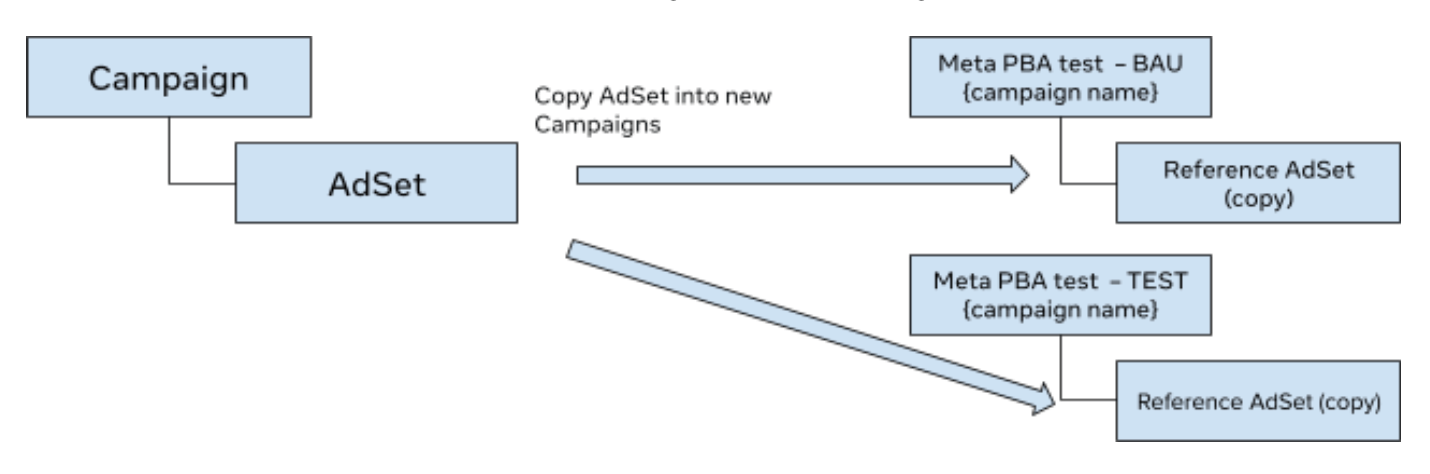
- Select Sales as your campaign objective, then click Continue.
- At the campaign level, select Campaign budget as your budget strategy, and Highest volume or Highest value as your Campaign bid strategy.
- Create and edit an ad set to configure these conversion settings:
- Conversion location: Select Website or Website + App
- Performance goal: Select Maximize number of conversions or Maximize value of conversions
- Dataset: select an eligible dataset
- Conversion event: Select Purchase
- Attribution model:
- Select Custom for Test
- Select Standard for BAU
- Select the custom attribution source (this should be “Rockerbox”):
- If using Web only, custom attribution source will be auto-populated
- If using both Web and App datasets, select the custom attribution source for each
- Save and stop for QA
Confirm creatives and targeting match for both test and control.
Step 2: A/B Test Setup
Set up a split test using the Experiments tool. Advertiser is responsible for setting up the A/B test in Experiments by clicking ‘Create an A/B test’. Meta help article for A/B test.- Add campaigns to test and control cells
- Campaign A (Test): Name: “Meta PBA test - TEST {campaign name}”
- Campaign B (BAU): Name: “Meta PBA test - BAU {campaign name}”
- For more complex designs (e.g., 3-cell), add additional cells and campaigns as needed
- Set the schedule
- Start date: one day BEFORE the campaign start date
- End date: one day AFTER the campaign end date
- DISABLE ‘End test early if a winner is found’ to preserve statistical validity
- Test Name
- Name your study clearly (e.g., Custom Attribution vs BAU - Q3 2026)
- Determining the winner:
- Select ‘Cost per purchase’ as the key metric for winner declaration
- Advertisers may add metrics for additional business-specific KPIs
- Advertisers should use Rockerbox to determine campaign winner
Step 3: Launch
Things to monitor during the test flight: Continue to monitor the following key metrics and reach out to Meta with any questions:- Ensure CAPI integration & campaign quality for changes in Events Manager/Ads manager
- Ensure your match key coverage remains consistent before and during the test
- Difference in attribution methodology. In Ads Manager, Custom Attribution results may show lower KPIs compared to Standard Attribution campaigns. This is because Custom Attribution reflects cross-publisher attribution, whereas Meta’s standard reporting uses single-source attributed results.
- Data processing timing. There may be data processing delays/differences in attributed conversion data Meta receives from the external analytics tool.