Browser Marketing to Mobile Purchase
The following diagram describes a user’s journey:- Engaging with the brand’s marketing activity on Google, Facebook, and via Email.
- Landing on the brand’s website
- Completing a Registration on the website
- Making a purchase in the brand’s mobile app
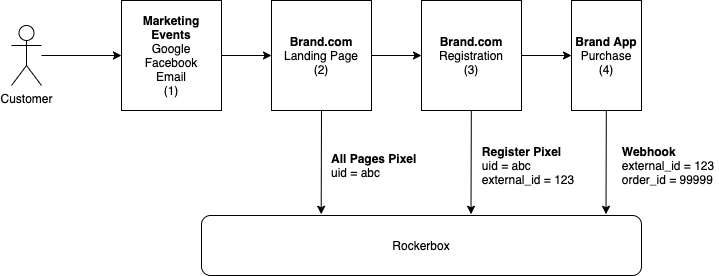
- The user engages with several marketing events: search, social, and email.
- When the user clicks through and lands on the brand’s website, a Rockerbox All Pages Pixel fires, which allows us to identify the user’s Rockerbox cookie ID (uid) along with the marketing event that drove the user to the landing page. At this stage, we now have associations between the uid and the marketing events.
- The user then completes a Registration on site. This fires a Conversion Pixel, which includes the customer ID (external_id value). Rockerbox now has an association between our cookie ID and the customer ID (or uid and external_id).
- Finally, the user completes a purchase via the brand’s app. The brand sends a Webhook to Rockerbox, which includes the external_id along with the order ID. Since we’ve previously connected the external_id to the uid, we are able to lookup that user’s prior marketing events.
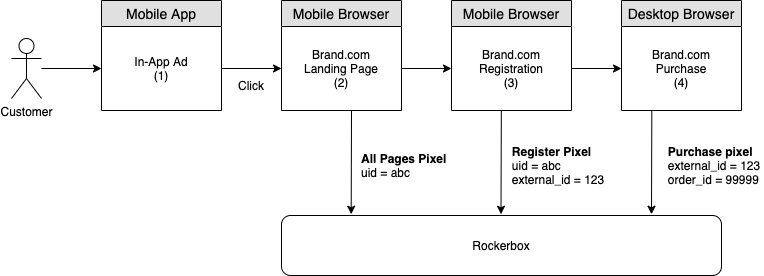
Mobile In-App Ad to Desktop Browser Purchase
The following diagram describes a user’s journey:- Engaging with the brand’s marketing activity from an in-app mobile ad
- Clicking through to the brand’s website on a mobile browser
- Completing a Registration on the mobile site
- Switching devices and making a purchase on a desktop browser